by JustinFreitas
Total Subscribers:
Description
CLOSE WINDOWS
=============
A Fantasy Grounds extension (FGC & FGU) that closes all the windows you've
opened, optionally leaving some of the common windows open.
FEATURES
--------
Close all windows you've opened, optionally leaving some of the common
windows open:
- Combat Tracker (CT)
- Party Sheet (PS)
- Image windows
- Timer extension window
Works on both host/DM and client/player, with each side able to tailor its
own settings independently.
USAGE
-----
There are several ways to trigger a close-all:
- Chat command: type /cw or /closewindows. You can also drag the command
to the hotbar for one-click access.
- FGC (Classic): click the "Close All" button in the right dock near the
bottom.
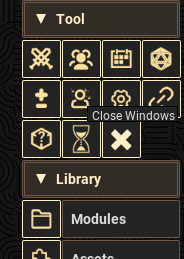
- FGU (Unity): click the "X" sidebar button at the top.
OPTIONS
-------
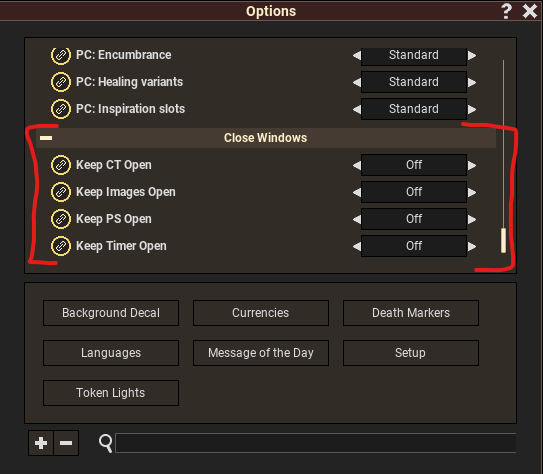
Each of the following can be toggled on/off under Options - Close Windows
(per host and per client):
- Keep CT Open Leaves the Combat Tracker open
- Keep PS Open Leaves the Party Sheet open
- Keep Images Open Leaves image windows open
- Keep Timer Open Leaves the Timer extension window open
All options default to off (everything closes).
COMPATIBILITY
-------------
- Fantasy Grounds Classic (FGC) and Fantasy Grounds Unity (FGU)
- CoreRPG and rulesets built on it
- Detects FGC vs. FGU automatically and wires up the appropriate UI button
and window hooks.
CHANGELOG
---------
v1.2 - 6/9/26
- Track window closes so the internal open-window list no longer grows
unbounded or retains stale handles (fixes closing being applied to
already-closed/reopened windows).
- Chain to the original FGC window handlers even for nil windows.
- Minor cleanup and clarifying comments.
v1.1 - 2/12/24
- Added Timer extension window to the keep-open options.
AUTHOR
------
Justin Freitas - (c) 2023-2026
UUID 397fd6a8-a2c1-11ee-8c52-0050562be458

