by wrandalljr4
Description
🔥 Savage Attacker Plus – Fully Automated for Fantasy Grounds Unity (5E 2026 Ruleset) 🔥
No more manual rerolls. No more second-guessing. No more forgetting your feat mid-combat.
This extension for Fantasy Grounds Unity (5E – 2026 ruleset) fully automates the official D&D 2024 Savage Attacker feat:
Once per turn, when you hit with a weapon attack, you can roll the weapon’s damage dice twice and use the higher total.
✅ What This Extension Handles
• Automatically detects successful weapon hits
• Supports critical hits (double weapon dice rule)
• Rerolls weapon damage dice automatically
• Compares both results
• Applies the higher total
• Enforces once-per-turn usage
• Resets automatically at the start of your turn
No extra clicks.
No manual tracking.
No math at the table.
It simply runs in the background and does the work for you.
⚔️ How It Works During Play
How It Works During Play
You make a weapon attack.
If you hit, damage rolls as normal.
A popup appears asking if you want to use Savage Attacker.
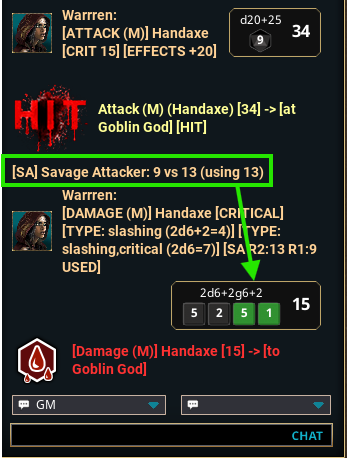
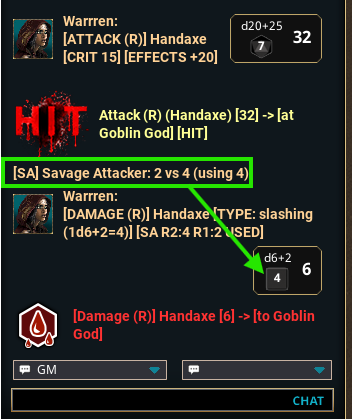
If you choose Yes, the extension rerolls the weapon damage dice and then asks which result you want: the first roll or the second roll.
If you choose No, the extension keeps the first roll and Savage Attacker stays available for your next hit this turn.
Once you use Savage Attacker, it is marked as used for the rest of your turn.
At the end of your turn, it resets automatically.
Critical hits are fully supported. On a crit, the extension rerolls the full doubled weapon dice roll and applies the higher total correctly.
🎯 Why Use This Extension?
Savage Attacker is easy to overlook or miscalculate in the middle of combat. This automation keeps the game moving and ensures the feat works exactly as written — every time.
Ideal for:
• Fighters
• Barbarians
• Paladins
• Any melee build focused on consistent weapon damage
If your character relies on Savage Attacker, this extension makes it seamless inside Fantasy Grounds Unity.
Watch how it works: Savage Attacker Extension Video
If there is an issue: --- End User Support: Here
Updates:
Savage Attacker flow (short):
When you hit with a weapon attack, the first damage roll is captured as Damage A. The extension then asks if you want to use Savage Attacker. If you choose No, Damage A is applied normally. If you choose Yes, the extension rolls the damage again as Damage B, marks Savage Attacker as used for that turn, and asks which roll you want to keep. Only the chosen roll is applied. At the end of your turn, Savage Attacker resets so it can be used again later.
Paladin Smite Flow:
This update adds automatic Paladin Smite tracking to the Combat Tracker. When a character with the Paladin’s Smite feature is added to the tracker, the extension automatically adds a Paladin smite effect and sets it to ON. On a melee hit, the extension sends a smite reminder in chat. When Divine Smite is applied through the normal effect workflow, Paladin smite automatically changes from ON to SKIP, then resets back to ON at the start of that character’s next turn. Effect coding is: Divine smite; ie: Divine smite; DMG: 2d8 radiant
Alert Initiative Swap
Alert Initiative Swap lets you target an ally and apply the ALERTSWAP effect to immediately swap your initiative with theirs in the Combat Tracker. Add ALERTSWAP to an Effect action on your Actions tab, set it to drop off on the next action or roll, and set the duration to 1 round. Apply it to the creature you want to swap with, and your initiative and theirs will be exchanged automatically.
Uncanny Dodge Flow:
When an attacker you can see hits you with an attack, the extension checks whether Uncanny Dodge is available. If it is, a popup asks if you want to use Uncanny Dodge. If you choose No, the damage is applied normally. If you choose Yes, the extension halves that attack’s damage, marks Uncanny Dodge as used by changing the Combat Tracker effect from ON to SKIP, and applies the reduced damage. At the start of your next turn, Uncanny Dodge resets back to ON so it can be used again. Uncanny Dodge only works against attack-roll hits, not save-based or area effects like Fireball.
Effect coding is:
Uncanny Dodge
Rogue - Cunning Strike - (Live)
The extension watches for a Rogue weapon attack that hits and qualifies for Sneak Attack. If it qualifies, it opens the Rogue popup and lets the player choose Sneak Attack or available Cunning Strike options based on the CT tags already on that actor.
WOBSNEAKATK means Sneak Attack is available. WOBCSTRIKE unlocks Poison, Trip, and Withdraw. WOBICSTRIKE raises the strike selection limit to two. WOBDSTRIKE unlocks Daze, Knock Out, and Obscure. WOBEWPN means Envenom Weapons is active.
Once the player confirms the popup, the extension stores how many Sneak Attack dice were spent. The damage part then rolls the weapon damage plus the remaining Sneak Attack dice after subtracting the spent dice.
After the damage is applied, the Cunning Strike part handles the selected effects. Poison, Trip, Daze, Knock Out, and Obscure force saves against 8 + Dex modifier + proficiency bonus. On failed saves, the right CT effects or messages are applied. Withdraw prints the movement message in chat. If Poison fails and the attacker has WOBEWPN, the target also takes the extra Envenom poison damage.
So the split is:
Sneak Attack file: detect hit, qualify, popup, pass result forward.
Damage file: subtract spent dice and add the remaining Sneak Attack dice to damage.
Cunning Strike file: handle saves, conditions, repeat saves, Withdraw message, and Envenom follow-up.
Rogue - Cunning Strike - Video
Rogue - Cunning Strike - Short - Video
Stone’s Endurance and Deflect Attack
DMGRED is for general damage reduction reactions such as Stone’s Endurance and similar abilities. When you take damage, the extension checks for a valid DMGRED effect on your character. If found, it asks whether you want to use it. If you choose Yes, the reduction is rolled, the damage is lowered, and the effect is set to skip until your next turn if uses remain. This is meant for features that reduce damage after you are hit, but do not require a specific attack-type trigger beyond taking damage.
DMGREDA is for attack-based damage reduction reactions such as Deflect Attacks and similar abilities. This version is more specific. It only works when the damage came from a qualifying attack hit, and it can also be limited by damage type if needed. When that happens, the extension checks for a valid DMGREDA effect first and asks whether you want to use it. If you choose Yes, the reduction is rolled, the damage is lowered, and the reaction is considered spent for that turn.
The order matters. If both DMGREDA and DMGRED are present, DMGREDA checks first because it is the more specific attack-triggered reaction. If you say No to DMGREDA, the extension then checks DMGRED and gives you that choice next. If you say Yes to either one, both are treated as spent for the turn and move to skip, since you only get one reaction.
Simple effect examples for players:
Stone’s Endurance style effect:
Stone's Endurance; DMGRED: 1d12+CON; USES: 3
Deflect Attacks style effect:
Deflect Attacks; DMGREDA: 1d10+DEX+LVL; DTYPE: bludgeoning,piercing,slashing
What the parts mean:
DMGRED means a general damage reduction reaction.
DMGREDA means an attack-based damage reduction reaction.
USES is how many times the effect can still be used.
DTYPE limits the trigger to specific damage types.
CON, DEX, and LVL let the reduction formula scale from your character stats or level.
Player view of how it feels in play:
You get hit and damage is rolled.
If you have a qualifying Deflect Attacks style reaction, that popup appears first.
If you decline it, your Stone’s Endurance style popup can appear next.
If you accept either one, the extension rolls the reduction, lowers the damage, and marks your reaction as used for the turn.
At the start of your next turn, the effect becomes available again if it still has uses left.
Stone’s Endurance and Deflect Attack - Short - Video
Parry
- Coming Soon!
Current Version
- Savage Attacker v2
Update
Added support for class-based scaling in Damage Reduction effects. DMGRED and DMGREDA formulas can now use class names directly as formula values, allowing effects to scale from specific class levels instead of only fixed numbers or total level. This means effects such as 1d10+DEX+FIGHTER, 1d10+WIS+CLERIC, or 1d10+DEX+MONK now read the matching class level from the character sheet and apply it to the reduction formula automatically. This makes it easier to build features like Battle Guard, Deflect Attacks, and other class-based defensive reactions with cleaner and more flexible effect text.
Fix:
Non-Critical rerolls: it no longer rolls any rider dice like for Hex and Hunters' Mark.
Savage Attacker v2: Critical issue; the pop-up only works on the GM side.
Smite LUA: was not changed from On to Skip due to AlertSwap. Code was rewritten to fix this.
Bugs:
Known bug (current): On critical hits, the reroll can sometimes include non-weapon damage dice (extra riders) instead of only the weapon’s dice. We’re currently working to resolve this bug.
Displays dice with zeros in chat. Just cosmetically, it does not affect anything. It will be resolved.
Compatibility Notice:
We cannot guarantee this extension will play nicely with every other extension. We test against a number of popular extensions, but conflicts can still happen. If you run into issues, try disabling other extensions to identify the conflict.
UUID e1915bfa-0bc9-11f1-a411-0050562be458

