M's Random Token Bag
by madman
500
Description
Random Token Bag
What it does
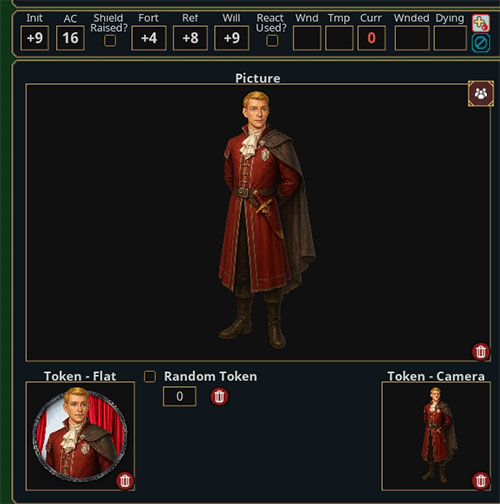
Let's you build a pool of alternate tokens for an NPC by dropping tokens from Assets onto the Token Window of the Pictures Tab.
When the NPC is added to the Combat Tracker, it can randomly pick one of those stored alternates and apply it to the CT entry.
How to use it
- Open an NPC
- NPC Pictures tab.
Add alternate tokens
- From the Assets window, drag a token onto the NPC’s Token image.
- Each drop adds that token to the NPC’s stored tokens.
- The number box increments as you add more.
- Dropping the same token again won’t duplicate it.
Enable randomization
- Check the Random Token box on that NPC.
When it does its thing
- When you add that NPC to the Combat Tracker, the extension picks a random stored token and applies it to the CT entry.
- As well, it works from an encounter that contains the NPC.
- Tokens selected can duplicate as they are random.
Clearing the token pool
- Click the delete button next to the count to clear all stored alternate tokens for that NPC.
Notes / Gotchas
- The random token is only applied when the NPC is added to the Combat Tracker.
- If the Random Token checkbox isn’t checked, the NPC behaves normally (last assigned token)
- Tokens must be valid token assets.
UPDATES
1.0.1 Added additional rulesets.
1.0.2 Changed the delete button to be hidden when the NPC is locked.

UUID e1b9758a-15cf-11f1-a411-0050562be458

