by Henix
Description
🔥 5E - AoE Spells Auto-Targeting & Upcast - BETA
⚠️ IMPORTANT: FREE BETA TESTING NOTICE
This extension is currently in open beta for 1 to 2 months (Starting from 17/05/2026). After the beta period ends, this extension will be retired and the final, polished version will be released as a paid extension due to its massive and complex scale (estimated between 1,000 to 1,500 Gold).
Download it now for free, test it out to see if it fits your table, and please report any bugs on the Fantasy Grounds forum!
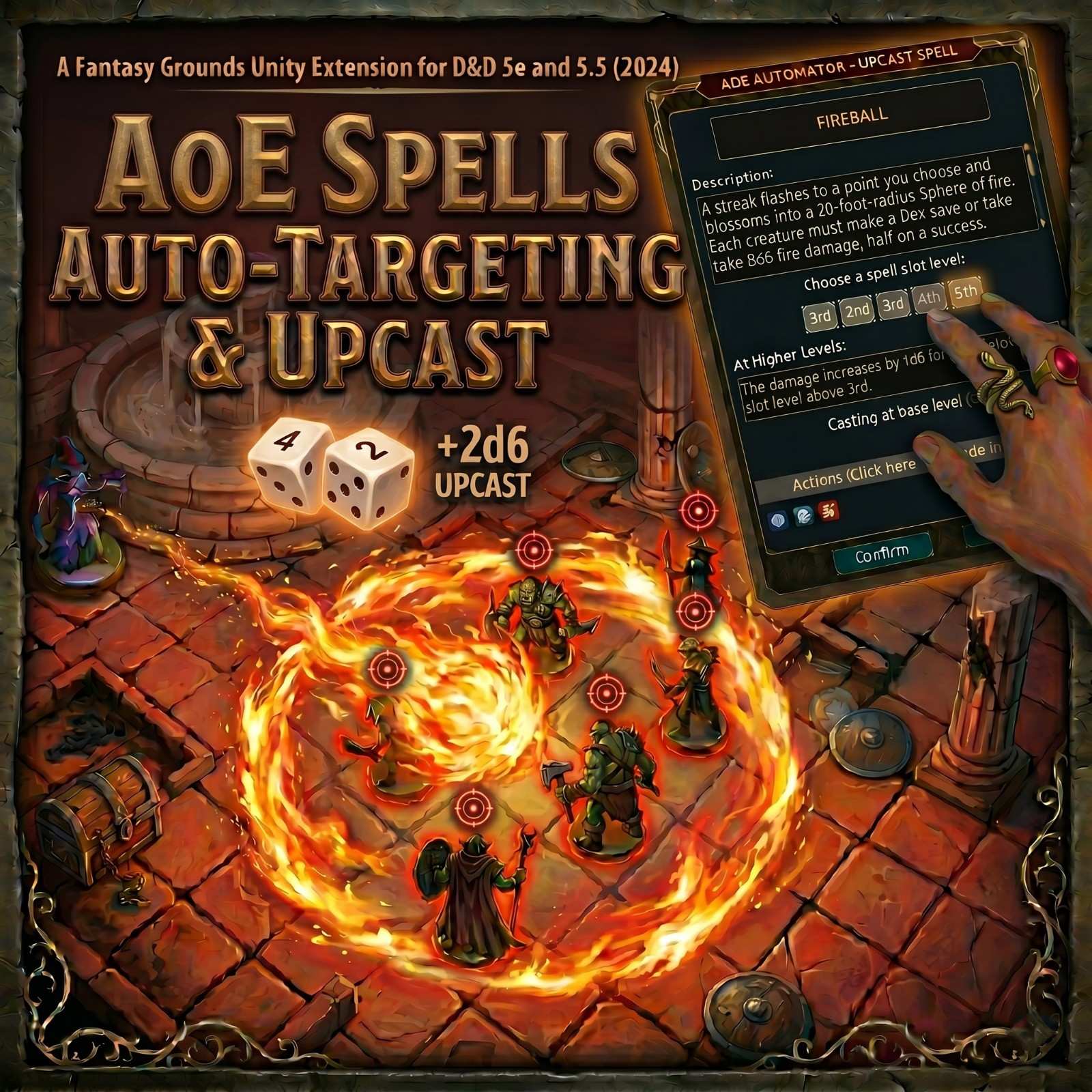
Stop manually dragging targets for AoE Spells like Fireball! This extension transforms Area of Effect (AoE) spells in Fantasy Grounds Unity, introducing a seamless workflow for template placement, automatic target resolution, and full upcasting support.
✨ Features Included
🚀 Smart Upcast System
Interactive Selection: When you cast a spell, a sleek dialog pops up showing available spell slots (including Warlock Pact Magic).
Automatic Scaling: Select a higher-level slot, and the extension automatically injects the extra damage dice into the roll!
Cantrip Upgrade: Automatically scales cantrips based on Character Level (5, 11, 17) without manual editing.
📐 Precision AoE Templates
Auto-Targeting: Place a template on the map and watch it instantly target every creature inside.
Live Preview: Tokens inside the area are highlighted with visual rings during movement or rotation.
Multi-Shape Support: Full support for Circles, Squares, Cones, Lines, and Emanations.
🔗 Persistent Spell Management
Concentration Link: Persistent spells (like Moonbeam, Cloud of Daggers, and more) stay on the map and are bound to your Concentration. If concentration breaks, the template is automatically removed.
Deferred Activation: Spawning a persistent template places it on the map for positioning first without triggering immediate damage or saves. Double-click the map token to activate the aura, apply concentration, and register the dummy actor in the Combat Tracker.
Dynamic Recalculation: Move your persistent template and the extension instantly recalculates targets. Click on CAST to force the saving throw for the new targets.
🎯 Advanced Tactical Control
Manual Overrides: Use
CTRL + Clickon the AoE tokens to manually include or exclude them from targeting—perfect for features like Careful Spell.Multi-Ray Automation: Track hits and crits across multiple projectiles (e.g., Scorching Ray, Magic Missile) and distribute damage correctly.
🤖 NPC Combat Tracker Integration
NPC AoE Automation: The Area of Effect (AoE) pointer button is directly integrated into NPC Spells and Actions within the Combat Tracker. GMs can instantly click or drag the targeting icon from the NPC's CT entry to spawn and target maps using the NPC's spell parameters.
🛠️ Homebrew & Custom Spell Support
The extension utilizes keyword parsing to detect AoE shapes, upcasting, and persistence. To ensure your homebrew spells are fully compatible, use the following formatting conventions in your spell descriptions.
📐 Area of Effect (AoE) Detection
To trigger a template, include the shape and size in the description (e.g., "A 20-foot radius sphere..."). The parser looks for these specific patterns:
Circle/Sphere:
X-foot radiusorX-foot sphereCone:
X-foot coneCube/Square:
X-foot cube(creates a square template of that side length)Line:
X-foot lineEmanation:
X-foot emanation(Note: Automatically adjusts the template size based on the caster's space!)
🎯 Targeting Logic
The extension can automatically filter targets if it finds these specific phrases:
All Creatures (Default): Use
each creatureorall creatures.Enemies Only: Use
your choice(e.g., "each creature of your choice") to ignore allies.Self Exclusion: Use
other than youororiginating from youto exclude the caster from the area.
🔄 Persistent Spells
To keep a template on the map and link it to the caster's Concentration, include one of the following phrases in the description:
on your later turnson later turns
📈 Upcasting & Scaling
Use these headers and phrasing to trigger the Upcast Dialog and automatic damage dice injection.
Level 1+ Spells
Header: Start the scaling section with
At Higher Levels:orUsing a Higher-Level Spell Slot:.Dice Scaling: Use patterns like:
1d6 for each slot level,increases by 1d8, or1d10 additional.
Cantrips
Trigger: Use
Cantrip Upgrade:to enable automatic scaling at character levels 5, 11, and 17.
🏹 Projectiles (Multi-Ray Tracking)
For spells like Magic Missile or Scorching Ray, use these phrases to enable the multi-hit tracker:
Base Spell:
create three rays,three glowing darts, orhurl three rays.Upcast Logic:
one additional ray for each slot levelorone more dart.
🧪 Henix Custom Effects (Advanced Automation)
This system allows you to build sophisticated spell and item effects utilizing inline upcast scaling, physical tabletop-physics dice rolling, and conditional deferral.
📈 Henix Inline Effects (Flat Upcast Scaling)
Tag Format:
X [+-Step/TAG]or[+-Step/TAG](e.g.,[+Step/HSULVL],[+Step/WIS],[+Step/Cle])Where X is the base value, Step is the scaling factor, and TAG is the variable to scale by. If X is omitted, it outputs a signed modifier.
Examples:
Aid; MAXHP: 5 [+5/HSULVL](Adds 5 per upcast level to base of 5. Cast at 3rd level it becomes 15)ATK: 2 [+WIS](Adds caster's Wisdom modifier dynamically to the attack)AC: 10 [+1/cle](Adds 1 per cleric level to a base AC of 10)
Supported Variables:
HSLVL,HSULVL,HCULVL,level(total level),prf(proficiency), ability modifiers (str,dex,con,int,wis,cha), and class levels (art,brb,brd,cle,dru,ftr,mnk,pal,rgr,rog,sor,war,wiz).
🎲 Henix Roll Tags (Physical Tabletop Rolls)
Tag Format:
[HR_DICE_SIDES]or[HR_DICE_SIDES_MODIFIER]Description: Tabletop-physics rolls that resolve individually per target, displaying graphical results in chat, and applying resolved values to Combat Tracker effects. Supports all variables listed in Inline Effects above.
Examples:
[HR_1_d8]- Rolls 1d8 physically on the tabletop.[HR_2_d6_-3]- Rolls 2d6 and subtracts 3.[HR_1_d10_+WIS]- Rolls 1d10 and adds caster's Wisdom modifier dynamically!
✨ Permanent Spell Aura & Deferral Examples
Moonbeam:
Moonbeam; LIGHT: 5 dim; AURA: [HAOEDIM] !self,once,point; Moonbeam AoE; SAVEA: [SDC] CON (H) (M); SAVEE: [SDC] CON (H) (M); SAVEDMG: [HAOEDMG]Sickening Radiance:
Sickening Radiance; AURA: [HAOEDIM] !self, once, point; Sickening Radiance AoE; SAVEA: [SDC] CON (M); SAVES: [SDC] CON (M); SAVEDMG: [HAOEDMG]; SAVEADD: ExhaustionHunger of Hadar:
Hunger of Hadar; AURA: [HAOEDIM] !self, once, pointer; Hunger of Hadar AoE; DMGA: [HAOEDMG_1]; SAVEE: [SDC] DEX (M); SAVEDMG: [HAOEDMG_2]Prismatic Spray (Divided into 3 actions for setup, main roll, and reroll of 8):
Setup:
PSR - [HR_1_d8]Main Action:
Prismatic Spray; SAVEA: [SDC] DEX (H) (M); IF: CUSTOM(PSR - 1); SAVEDMG: 12d6 fire; ELSEIF: CUSTOM(PSR - 2); SAVEDMG: 12d6 acid; ELSEIF: CUSTOM(PSR - 3); SAVEDMG: 12d6 lightning; ELSEIF: CUSTOM(PSR - 4); SAVEDMG: 12d6 poison; ELSEIF: CUSTOM(PSR - 5); SAVEDMG: 12d6 cold; ELSEIF: CUSTOM(PSR - 6); SAVEADD: Restrained; ELSEIF: CUSTOM(PSR - 7); SAVEADD: Blinded; ELSE; SAVEADD: PS Reroll; SAVEADD: PS Reroll;Reroll (8):
PS Reroll; PSR8 - [HR_1_d7]; SAVEA: [SDC] wisdom (H) (M); IF: CUSTOM(PSR8 - 1); SAVEDMG: 12d6 fire; ELSEIF: CUSTOM(PSR8 - 2); SAVEDMG: 12d6 acid; ELSEIF: CUSTOM(PSR8 - 3); SAVEDMG: 12d6 lightning; ELSEIF: CUSTOM(PSR8 - 4); SAVEDMG: 12d6 poison; ELSEIF: CUSTOM(PSR8 - 5); SAVEDMG: 12d6 cold; ELSEIF: CUSTOM(PSR8 - 6); SAVEADD: Restrained; ELSE: SAVEADD: Blinded
⚙️ Settings & Chat Commands
⚙️ Custom Setting Options
"Show HR roll result" option cycler (ON/OFF): Located under the new settings group "AoE & Upcast Extension" to control chat roll log clutter.
ON: Shows the full graphical die bubbles and sums in the chat log.
OFF: Silently processes the physical tabletop rolls and applies them to the Combat Tracker.
💬 Chat Commands (Host Only)
/aoereset— Resets all PC spells' database settings back to standard FGU settings. Useful if you change sizes/shapes and want to clear out cached configurations for all characters./aoereset "PC Name"— Resets spell database settings only for the specified character (e.g.,/aoereset "Gandalf").
⚙️ Setup & How to Use
Click the "Use Power" button for an AoE spell.
Select your upcast level in the popup dialog.
Place the template on the map.
Roll save or damage! The targets are already waiting in the Combat Tracker.
📺 Watch the Showcase Video
- YouTube - Base Extension:
How it Works - Showcase Video
- YouTube - GENERAL UPDATE:
How it Works - Showcase Video - YouTube - VISUAL and QOL UPDATE:
How it Works - Showcase Video - YouTube - VISUAL and QOL UPDATE 2:
How it Works - Showcase Video
📦 Compatibility & Support
Rulesets: Designed for the D&D 5E and 5.5e (2024) Rulesets.
FGU Version: Optimized for current FGU architecture.
🐞 Bug Reports
If you encounter issues with template placement or upcast math, please drop a comment in the support thread!
📝 Changelog
V0.4 - Visual and QOL 2 Update
🎨 Visuals, Projectiles & Widgets
- Beam & Projectile FX Overlay: Added dedicated FX handling for beams and projectiles. Their length, thickness, and directional offsets now dynamically scale and align perfectly relative to both the casting creature's size (e.g., Large or Huge tokens) and the specific map grid size, ensuring the visual overlays vanish cleanly from the map the moment the action is finished.
- Dedicated Heal FX Overlay: Added a brand new, dedicated visual effect overlay specifically for healing actions. The visual overlays now vanish cleanly from the map the moment the healing action is completely finished.
📐 AoE Dummy Tokens & Vision
- AoE Dummy Senses: Added native senses (like Darkvision) to AoE dummy tokens to align perfectly with ruleset standards.
- Vision & Dummy Properties: Embedded vision parameters directly into the AoE dummy tokens, including a "No Vision" option to disable sight completely based on your table preferences.
⚔️ Mechanics & Core Automation
- Sequential Action Ordering: Implemented clean action order serialization and completely optimized spell field resets.
- `HCHOOSE` Player-Choice Tags: Formally added player-choice tags (HCHOOSE_) and resolved corresponding widget layering bugs.
- Heal Queue Repeat Fix: Squashed a bug that caused healing actions to erroneously repeat on a stale attack hit queue.
✨ Dialogs & UI Polish
- New Global "Spells" Configuration Tab: Added a brand new, highly-requested "Spells" tab to the main settings window. GMs can now save, load, and manage default configurations for automated spells directly within the master list. When a spell is dragged and dropped or added onto a PC sheet, all attached actions, visual templates, and custom configurations load perfectly out of the box!
- Help Dialog Improvements: The Help window is now fully draggable to the fastbar/records. Also corrected the visual square link icon formatting.
- Choice Dialogs: Properly resized choice popups and tweaked prompt text elements for vastly improved clarity.
- Upcast Dialog: Fixed FGU layout engine anchoring warnings regarding static control heights.
- Settings Interface Refactor: Completely refactored the tab layouts, cleanly segmented the import/export configuration tools, and implemented legacy fallback support.
✨ Documentation
- Consolidated all extension features, automation instructions, and tag syntax rules into a single, comprehensive, up-to-date documentation file.
V0.3 - Visual and QOL Update
🎨 1. Custom AoE Widgets & Visual Templates
Custom Image Underlays: You can now completely replace default FGU geometric borders with custom image textures (like fire graphics, ice textures, etc.) mapped directly to your spell pointers.
Asset Configuration Tab: GMs now have a dedicated configuration tab inside the AoE Automator popup to easily define, import, and export custom spell-to-widget templates.
Granular Transformation Controls: Independently adjust X/Y scaling offsets, rotate graphics, and tweak positional coordinates to ensure your custom textures fit the map grid perfectly.
Smart Name Fallback: No need to manually assign assets everywhere! The graphics system automatically falls back to matching the Spell Name out of the box.
Opt-Out Flexibility: Leave the custom token field blank or type
"NONE"to entirely bypass custom visuals for specific spells and revert to default FGU layouts.Opacity Control Sliders: Added advanced sliders for border and token opacity management, giving GMs total control over visual map clutter.
📐 2. Advanced Map Geometry & Targeting Rules
New Geometry Templates: Full native support added for Wall shapes (with customizable thickness and length) and Ring shapes (targets a hollow band, completely ignoring the center area).
Global Token Intersection Options: Added a new global option to dictate targeting overlap tolerance (Center, Quarter, Near Edge, and Touching), giving you precise control over how much of a token's space must intersect with the template boundary to count as a hit.
Pixel-Perfect Rebuilds: Re-engineered the underlying math for Line and Cone templates to ensure near pixel-perfect alignment and precision on the grid.
3D Aura Rotation Sync: Integrated with 3D Aura effect structures. Pointers and auras now flawlessly sync rotationally on 3D maps using advanced
3drecttranslation formulas, squashing old rotation offset bugs.Aura Vis Bypass: If you prefer using external Aura Vis graphics over the native textures, simply set token and border opacities to
0to seamlessly hand over visual processing.Smart "Object" Type Filtering: Permanent AoE spell tokens are now natively flagged as
"Object"types, allowing proper Aura tracking and completely removing the need for clunky!selfstring filtering.Targeting Safeguards & "All but NOT self" Mode: Non-permanent (instant-cast) spells like an instant Fireball will now automatically ignore
"Object"types so instant blasts won't mistakenly target persistent spell tokens. We've also formally added the"All but NOT self"targeting cycler option to exclude the caster during template placement.
👑 3. Player Control & Persistent Spell Automation
PC Token Ownership: Players are now granted full database and token instance ownership of their persistent spells. This allows players to select, move/drag, rotate, and delete their own persistent spell tokens directly on the map!
Spell Multi-Template Chaining: Individual spells now support up to 4 chained templates. We've added
[1]–[4]template index buttons, a dynamic"+"button to add templates, and a trash button to delete templates (with automatic shifting to close gaps).Deferred Token Activation: Dummy Combat Tracker entries and concentration are now deferred to a map-token double-click rather than triggering instantly during initial spell cast resolution.
Default Token Visibility: Persistent dummy CT entries now default to Visible so players can instantly see their permanent AoE tokens and attached widgets on the map.
⚔️ 4. Fixes & Layout Optimization
Synchronous Layout Driver: Fixed long-standing FGU anchoring issues. The indented faction boxes now natively expand and contract instantly and smoothly without throwing console warnings.
Dual-Axis Dialog Resizing: The AoE/Upcast configuration window now supports dragging to resize in both directions with custom minimum boundaries. Separators and padding scale dynamically to match.
Duration & Concentration Tags: Added automatic effect duration tracking on the caster for persistent AoEs pulled straight from the spell description, and corrected the
(C)tag to only apply to spells that actually require concentration.
⚡ 5. Performance, Integrations & General Polish
🚀 80% Load Time Boost & Database Sync: Highly optimized extension initialization and campaign load speeds. The AoE spell templates list is now server-synchronized (read-only for players, GM editable) and JSON import/export is restricted strictly to the Host.
"Jack of all Things" Integration & Item Casting Fixes: Added compatibility to trigger templates when casting directly from items or scrolls. Item-based spell node resolution was also improved to support martial characters without spell slots.
Private NPC Chat Avatars: NPC spell slot usage and fizzle chat messages are now routed privately to the GM and display the NPC's actual Combat Tracker token avatar in the chat log.
Precise Micro-Rotation: Restored the micro-adjustment rotation step via
SHIFT+CTRL+Scrollto a precise 1-degree increment (down from 3).Double-Scaling Fix: Resolved a bug where reloading FGU would repeatedly shrink permanent spell tokens due to reapplied multipliers. Scaling is now locked exactly once inside a persistent campaign database node.
NPC Cantrip Scaling: Fixed calculation bounds to properly resolve character-level thresholds for NPC cantrips.
Runtime Debug Command: Added the
/aoedebug [on/off/true/false]chat command to toggle debug logging at runtime (defaulting to off for public releases).UI Polish: Enhanced metadata panel vertical heights and control spacing to completely prevent text truncation.
v0.2 - GENERAL Update
🧪 Henix Custom Effect System:
Inline Effects: Enabled scaling of flat bonuses by slot upcast level (e.g.,
MAXHP: 5 [+5/HSULVL]).Roll Tags: Integrated physical 3D tabletop-physics rolls (e.g.,
[HR_1_d8]) resolved separately per target with graphical chat results.Self-Contained Modifiers: Added support for custom modifier scaling inside rolls (e.g.,
[HR_1_d8_-3]or[HR_1_d8_+WIS]) combining modifiers and caster stats.Custom FGU Setting: Added "Show HR roll result" option cycler (ON/OFF) to control chat log clutter.
🤖 Combat Tracker NPC Support:
NPC Combat Tracker Support: Spells/actions showing AoE automator and now render a small
button_targetingicon directly in their Combat Tracker row.
✨ In-App Help & Persistent Spell Improvements:
In-App Help Button: Added a "?" button in the spell config dialog that opens a reference guide pop-up dynamically formatted using native headers, lists, and tables.
Deferred Persistent Activation: Spawning a persistent AoE token now positions it first; double-clicking the map token activates its aura, concentration link, and Combat Tracker entry, preventing accidental damage triggers.
Granular Damage Tags: Added support for
[HAOEDMG_X]tags (e.g.,[HAOEDMG_1],[HAOEDMG_2]), allowing spells with multiple checkboxes (like Hunger of Hadar) to separate different damage types into different aura clauses while supporting custom upcast scaling.
v0.1 - BETA Release
Initial Release: Core automation for Upcasting, Cantrip Scaling, Persistent AoE, and Auto-Targeting.
UUID cd42860e-40b4-11f1-a411-0050562be458

